UPDATES
New in Netwalk: Smarter Charts, Cleaner Location Input, and Customizable Statements
New in Netwalk: Smarter Charts, Cleaner Location Input, and Customizable Statements
Discover NETWALK’s latest updates: personal book favorites, shared talent folders, public feature values, and mother agency commission reports.
Preparing a client package, refining a talent shortlist and reviewing mother agency commissions involve different teams, but they are all part of the same agency workflow.
The latest NETWALK updates give bookers more flexibility in their selections, help colleagues organize shared talent groups and provide accounting teams with dedicated views of commissions receivable and payable.
Here is a closer look at the main updates and how they support everyday agency work.
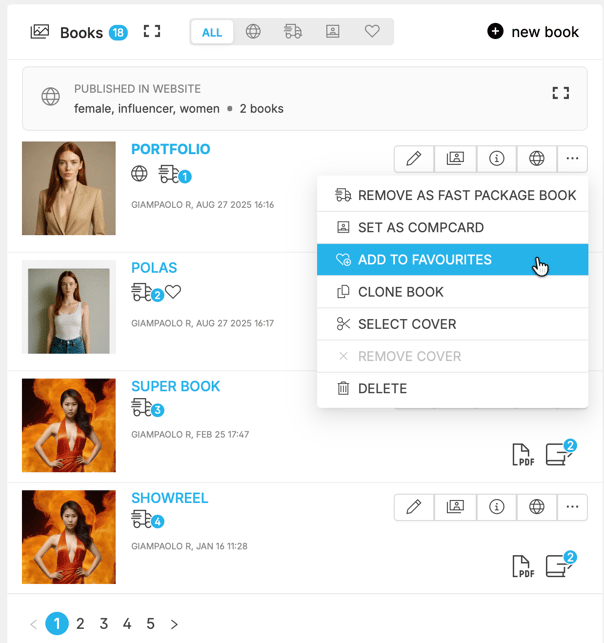
Fast Pack allows your agency to define a preset selection of books for each talent. Favorites brings the same convenience to the individual user: each booker can maintain a personal selection without changing the agency’s Fast Pack.
This is useful when colleagues regularly choose different material for the same talent. Each person can keep their preferred books ready instead of selecting them again whenever they prepare a package.
Mark a book as a favorite using the heart action. You can then filter the books card to show only your favorites and quickly access the material you use most.
From the models wall or directly inside a package, the Favorites action adds your favorite books with one click.
For recurring presentations, this reduces repetitive selection work and gives you more time to review whether the package fits the client’s brief.
On desktop, hovering over Fast Pack, Comp Cards or Favorites shows the books that will be added. The same preview is available when adding talents inside a package.
You can check the proposed material before including it, reducing the need to add books and remove them afterward. This hover preview is available on desktop only.
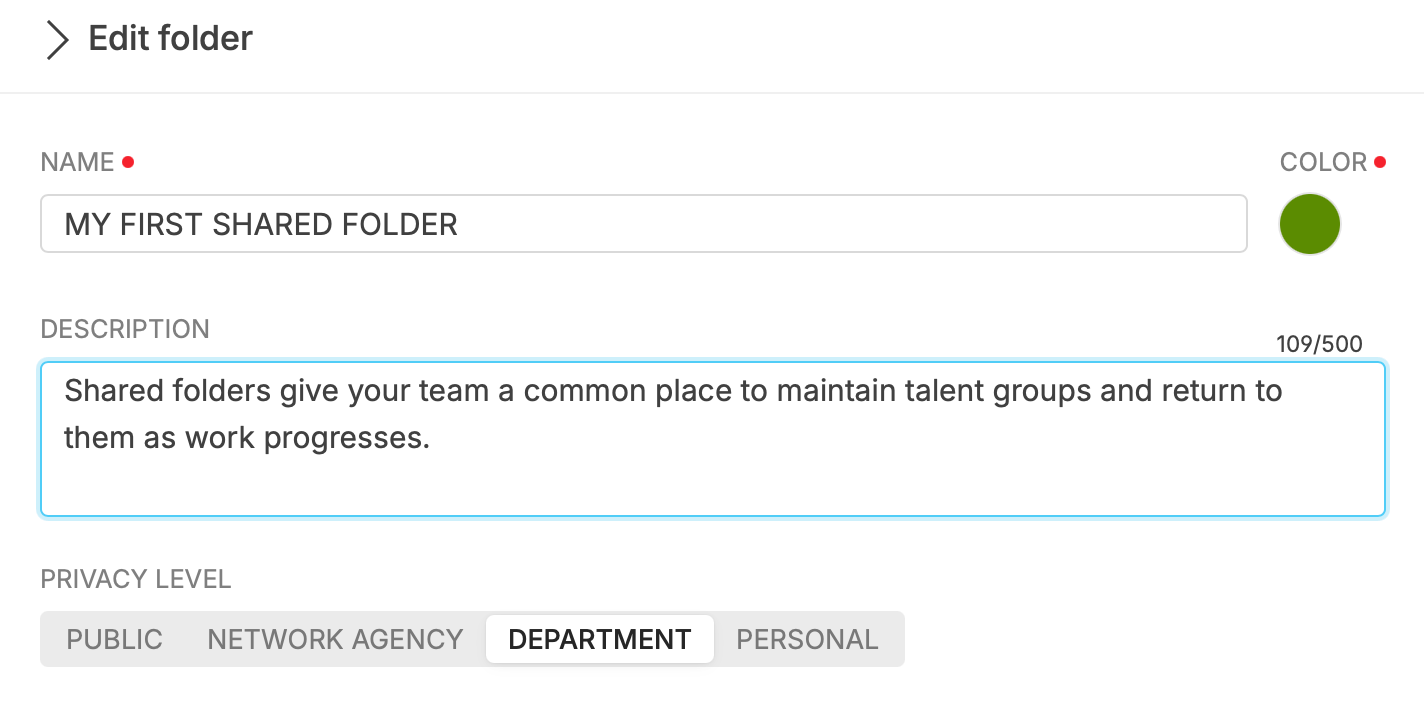
Folders can be personal or shared with your department or network. Each folder has a description, color and visibility setting, helping your team understand its purpose and find the right selection.
A booker can keep a working selection private, while a department can maintain a shared group of talents that colleagues need to access.
The folder’s description, color, and visibility are managed in a single panel, with changes saved automatically.
On the models wall, you can filter for talents in selected folders and exclude those in others.
For example, you might start with a broad group of talents to consider and exclude anyone already on a separate shortlist. NETWALK applies those conditions together, reducing the need to compare the groups manually.
This makes folders useful both for organizing talent groups and for refining selections as a brief develops.
The folder menu separates folders a talent already belongs to from those they can still be added to. An information panel in the sidebar and a full-page model selector provide additional space for reviewing and managing selections.
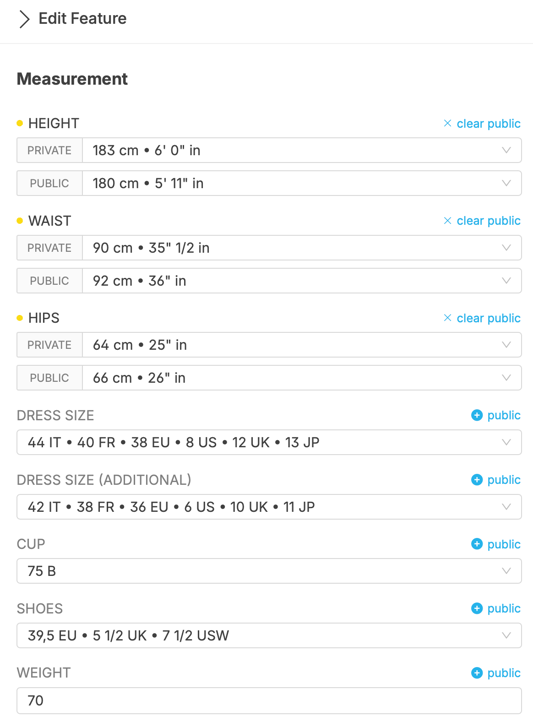
A talent’s characteristic can now have an internal value and a separate public value.
Once the public value is entered, it appears in packages and on your agency’s website. The internal value remains available in NETWALK, allowing your team to retain the information used internally while managing what clients see.
The features editor places the public field next to the internal one, making it easier to review the relationship between the two values. Public values are not available for yes/no features.
Talent searches take into account both internal and public values.
This matters when a colleague searches using the information shown to clients while another works with the internal value. Both can find the talent without knowing which version of the information the other person is using.
The result is greater control over external presentation while preserving the usefulness of your internal searches.
The talent CSV export includes a Use public features option.
When enabled, the export uses the public value wherever one exists. The option is off by default, so users can decide which values are appropriate for each export.
Public values are also visible in the mobile features panel, keeping this information accessible when reviewing a talent from your phone.
Agencies need to review both commissions receivable through their own mother agency activity and commissions payable to other mother agencies.
NETWALK now provides dedicated reports for these two perspectives.
The receivable report brings together mother agency commissions, debits, credits and expenses by client.
It uses the same filtering options as the clients report, helping your accounting team focus on the records relevant to its review and examine the related amounts together.
The new Reports → On M.A.C. (payable) report lists the commissions owed to each mother agency alongside job fees, adjustments, expenses, debits and credits.
Clicking an agency’s name opens its statement, providing a direct route from the report to the agency’s account details.
Together, the receivable and payable reports give your team focused views for reviewing mother agency commission activity and identifying entries that need further attention.
Both reports are available from the accounting menu on desktop and mobile.
These updates support practical improvements across the agency: bookers can reuse their preferred material, teams can maintain shared talent selections, and managers can control how talent information is presented externally.
For accounting teams, dedicated mother-agency reports and clearer navigation make it easier to review figures and access the relevant account details.
NETWALK continues to evolve around the daily work of model and talent agencies, connecting talent management, client presentations, booking and accounting in one platform.
New in Netwalk: Smarter Charts, Cleaner Location Input, and Customizable Statements
Streamline your invoicing process with Netwalk's new XML support, designed specifically for Italian e-invoicing standards.
Discover Netwalk's February 2026 updates: smarter booking, faster workflows, and improved invoice control for model and talent agencies.